ARCCAPTAIN MIG205MP Welder and Plasma Cutter Review: Worth It? (October 2026)
The ARCCAPTAIN MIG205MP suits a shop that will use several welding processes and plasma cutting in one machine. Its dual-voltage input and app controls add flexibility, while aluminum spool-gun welding requires a separate purchase.
On this page (10 sections)
- The ARCCAPTAIN MIG205MP at a glance
- What welding and cutting modes does it offer?
- How should you read the cut thickness ratings?
- What do the controls and app add?
- What power and setup details should you check?
- How can you avoid common setup mistakes?
- What are the main trade-offs?
- How does the MIG205MP compare with alternatives?
- Is the ARCCAPTAIN MIG205MP worth considering?
- Related welding and plasma cutter guides
The ARCCAPTAIN MIG205MP combines welding, plasma cutting and cleaning modes in one machine. For a home or small repair shop, its 9 modes, app controls and 120V/240V input make sense when you expect to switch between processes.
The main buying questions are whether you'll use that range, whether your power and air setup fit the work, and whether you are willing to buy a separate spool gun for aluminum welding.
The ARCCAPTAIN MIG205MP at a glance
The MIG205MP is a multi-process machine for a shop that wants MIG, TIG, stick, plasma cutting and cleaning functions in one unit. Its app and preset memory suit people who want to save settings and return to them later.
ARCCAPTAIN MIG205MP: Best for multi-process shops
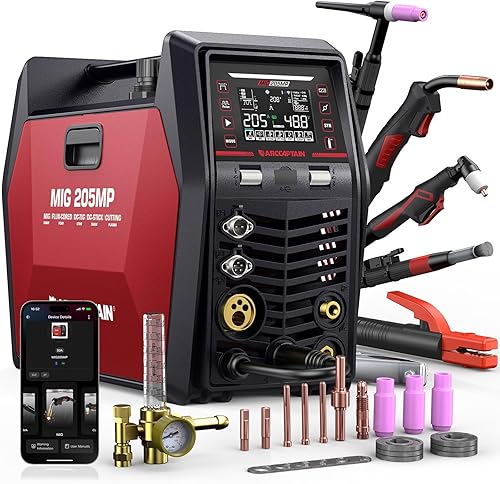
- 9 welding and cutting modes
- 120V/240V dual voltage
- App control with preset memory
- 10 mm quality cut rating
A feature-rich choice if you want multiple welding modes, plasma cutting and app-based parameter control in one machine. The spool gun for aluminum welding is sold separately.
Pros
- 9 listed modes
- App supports parameter adjustment and preset memory
- Dual-voltage design
- DC HF and Lift TIG support
Cons
- Spool gun is an extra purchase
- Maximum severance rating is not the same as a quality cut
Who should consider the ARCCAPTAIN MIG205MP?
Choose it if you have varied repair or fabrication tasks and will use more than one of its processes. It can make sense for a garage or farm shop that needs welding and cutting capability but has limited room for separate machines.
Skip it if you only need a basic MIG or stick welder, rarely cut metal, or want aluminum capability ready without buying another accessory. A single-purpose machine may be easier to set up if your work is consistent and does not need the extra modes.
The MIG205MP's aluminum mode relies on a separately purchased spool gun. If aluminum is central to your work, include the gun and its compatible setup in your decision, and compare it with a dedicated aluminum arrangement.
What welding and cutting modes does it offer?
The MIG205MP offers 9 modes spanning gas and gasless MIG, two DC TIG start methods, stick, spot welding, plasma cutting, cleaning and spool-gun aluminum welding. Each process still needs the right torch, consumables, gas or air supply, and setup.
| Mode | What to know |
|---|---|
| Gas MIG | For MIG work with shielding gas |
| Gasless MIG | For flux-core wire work without shielding gas |
| DC HF TIG | High-frequency start for DC TIG |
| DC Lift TIG | Lift start for DC TIG |
| MMA Stick | Stick welding |
| Spot Welding | Spot mode |
| Cut | Plasma cutting |
| Clean | Cleaning mode |
| Spool Gun Aluminum | Requires a separately purchased spool gun |
The TIG modes are DC HF TIG and DC Lift TIG. If your work calls for AC TIG, this machine's modes do not include it.
Count only the modes that match your likely jobs. A broad list is useful when you switch processes, but it adds little value if you will use only one or two and prefer a simpler machine.
Our guide to MIG, TIG, stick and other welding machine types explains where each process fits. If you expect to use several processes, read whether a multi-process welder is worth it for a home shop.
How should you read the cut thickness ratings?
The MIG205MP has a 10 mm quality cut rating and an 18 mm maximum cut rating. Use the quality rating as the practical comparison point for cuts where edge quality matters, and treat the maximum as a limit rather than the expected finish.
Cut quality changes with material, setup and cutting conditions. If your regular work is near the maximum figure, compare machines by their quality cut ratings and choose based on the result your jobs need.
The cutting current range is 20–50A, and the machine has a 60% rated duty cycle. The duty-cycle figure does not specify a separate run time for every process and setting, so check the manual for operating guidance that applies to your work.
For more context, see how thick a plasma cutter can cut. Plan a scrap piece of similar material before committing to a finished cut, especially when you are dialing in a new setup.
What do the controls and app add?
The MIG205MP pairs a large LED display with app-based parameter adjustment and preset memory. Within a stated 10-meter range, the app can adjust settings, monitor status and save named custom presets.
Its parameter-matching system adjusts current and voltage based on the selected metal type or electrode size. Experienced users can also adjust advanced settings, including MIG inductance and burn-back, TIG pulse frequency and descent time, and MMA hot start and arc force.
Preset memory is most useful when you repeat jobs and want to return to settings you have already established. Name presets by material and process, then confirm the selected mode and consumables before welding.
The app adds another way to reach settings, but it does not replace learning the controls or following the manual. If you prefer to make changes directly on the machine with gloved hands, compare the YESWELDER MCT-520, which uses physical dials and a large display.
What power and setup details should you check?
The MIG205MP supports 120V and 240V input, so choose the voltage that matches the available power and the demands of your work. Confirm outlet and circuit requirements in the manual before choosing a location or starting a job.
ARCCAPTAIN warns against switching voltage while the screen is on. Wait until the screen turns off before changing between 120V and 240V, and follow the manual for the connection procedure.
At 46.2 lb, it is a substantial machine to move between work areas. Its dimensions are 17.3 x 7.88 x 12.7 in, so measure your storage space and leave room to access the controls, cables and connections.
Plasma cutting uses compressed air, so plan an appropriate air source and check the manual for required air conditions. Our guide explains whether a plasma cutter needs an air compressor.
Before setup, lay out the machine, torch, ground connection and consumables so cables can reach without creating a trip hazard. Make sure the work area is suitable for hot metal and sparks, and use the protective gear required for the process.
How can you avoid common setup mistakes?
Start by matching the process to the job and checking every connection before powering up. Many early problems come from using the wrong process, wire, gas arrangement or consumable for the intended material.
Do not assume the parameter-matching system removes the need to confirm settings. Verify material type, electrode or wire size, polarity and process requirements in the manual, then make adjustments on scrap before moving to the finished work.
For plasma cutting, do not treat the maximum thickness as a clean-cut target. Begin within the quality rating and follow the manual's guidance for air, torch consumables and cutting technique.
For aluminum, plan the spool gun before buying the machine for that purpose. Confirm the compatible gun and related setup requirements, since the spool gun is sold separately.
What are the main trade-offs?
The MIG205MP's main trade-off is process range versus setup complexity. One machine can cover several jobs, but each process has its own accessories, consumables and settings to manage.
The included components are identified as a MIG welder, so confirm the package contents before relying on a particular torch or accessory for a planned task. The spool gun is a separate purchase, and aluminum work depends on having that additional equipment.
The duty-cycle rating is useful context, but it does not tell you how long every process can run at every setting. Read the manual's process-specific instructions and plan pauses around the job.
For a beginner, automatic parameter matching and a clear display can reduce the initial number of adjustments. They do not remove the need to learn safe setup, select the right consumables and understand what a good weld or cut should look like.
How does the MIG205MP compare with alternatives?
The MIG205MP stands out for its 9 modes and app-based setup, while the alternatives offer different controls, included equipment and process features. Choose according to the features you will use and the accessories you need.
The YESWELDER MCT-520 fits buyers who prefer physical dials and a 7 in display. It supports Gas MIG, Flux Core MIG, CUT, HF TIG, MMA and spool-gun aluminum welding, with the spool gun sold separately.
The FEMEROL 200A combo suits buyers who value included accessories. Its package includes MIG, plasma and TIG torches, an air filter regulator and other items, while its 10 mm ideal clean cut rating applies under 220V.
The ARCCAPTAIN MIG205PCT is the closer alternative if pulse modes matter. It has pulse Gas MIG and pulse TIG options alongside app controls, preset memory and a 10 mm quality cut rating.
Choose the MIG205MP when its process mix and app controls fit your routine. Pick the MCT-520 for direct physical controls, the FEMEROL when its included accessories fit your needs, or the MIG205PCT when pulse modes are a priority.
Is the ARCCAPTAIN MIG205MP worth considering?
The MIG205MP is worth considering if you'll use its welding, cutting and cleaning functions and want to save settings in an app. Its dual-voltage design and DC HF and Lift TIG options add flexibility to a multi-process shop.
It is a poor fit if you only need one process, want aluminum equipment included, or have no use for plasma cutting. Before you buy, match its quality cut rating to your usual material, confirm the power and air setup, and check which accessories come in the package.
For other combined-machine options, see our guide to welder and plasma cutter combos. Pick the ARCCAPTAIN MIG205MP when its modes and controls match the work you do; choose another machine when physical dials, included accessories or pulse modes better suit your shop.
Related welding and plasma cutter guides
- Welder and plasma cutter combos
- Do you need an air compressor for a plasma cutter?
- How thick can a plasma cutter cut?
- Is a multi-process welder worth it for a home shop?
Frequently asked questions
Can the ARCCAPTAIN MIG205MP cut and weld?
Yes. The MIG205MP combines Gas MIG, Gasless MIG, DC HF TIG, DC Lift TIG, MMA Stick and Spot Welding with Cut and Clean modes.
It also supports spool-gun aluminum welding, but the spool gun is an extra purchase.
How thick can the MIG205MP cut?
ARCCAPTAIN gives the MIG205MP a 10 mm quality cutting thickness and an 18 mm maximum cutting thickness. Treat these as different targets: the maximum figure does not mean every cut at that thickness will have the same quality as a thinner cut.
Does the ARCCAPTAIN MIG205MP work on 120V and 240V?
Yes, the MIG205MP has a 120V/240V dual-voltage design. ARCCAPTAIN says to wait until the screen turns off before switching between the two voltages; check the manual and your available circuit before setup.
Does the MIG205MP include a spool gun?
No spool gun is included in the stated package contents; the product information says to buy one separately for spool-gun aluminum welding. Check which compatible gun and other consumables you need before planning aluminum work.